Enterprises, small teams, and individuals face the same challenge: copying files or imaging a disk does not guarantee that an application or business system can be restored when it matters.
PeppyKeep is an application-aware backup and recovery solution for critical data. It provides configurable backup jobs, automated execution, versioned copies, restore verification, recovery drills, and policy-based retention across devices, nodes, and sites.
PeppyKeep helps users follow a documented, repeatable recovery path when files are deleted, services fail, or configurations are damaged. Recovery drills help identify backups that exist but cannot be restored before they become a crisis.
Backups can be stored locally or in S3-compatible object storage and other user-selected destinations. When users configure destinations across separate locations, PeppyKeep can support true geographic redundancy and multi-site disaster-recovery architectures, including models inspired by the banking industry’s two-site, three-center approach.
PeppyKeep supports Windows, macOS, and Linux, with installation and user documentation available for each platform.
About PeppyKeep
PeppyKeep (PPK) helps enterprises, teams, and individuals configure, verify, and restore critical data backups.
The product is designed around real-world business systems and operating scenarios, with timeline-based versioning, explicit restore points, and recovery drills that help confirm whether a backup can be used when needed.
PeppyKeep supports encrypted backup workflows in which users generate and retain control of their own key pairs.
1.Product positioning
PeppyKeep goes beyond scheduled backups by combining execution checks, validation, restore verification, and recovery drills. The goal is not simply to create backup files, but to maintain copies that users can verify and restore.
Protection is scoped to specific applications, business systems, and working environments rather than whole-disk clones or undifferentiated full copies. PeppyKeep addresses operational requirements such as durable writes, multi-path configurations, and consistency between databases and business files through timeline-based backup and retention policies.
Read: Generative AI in Business Apps: Practical Use Cases Beyond Chatbots
2.Key capabilities
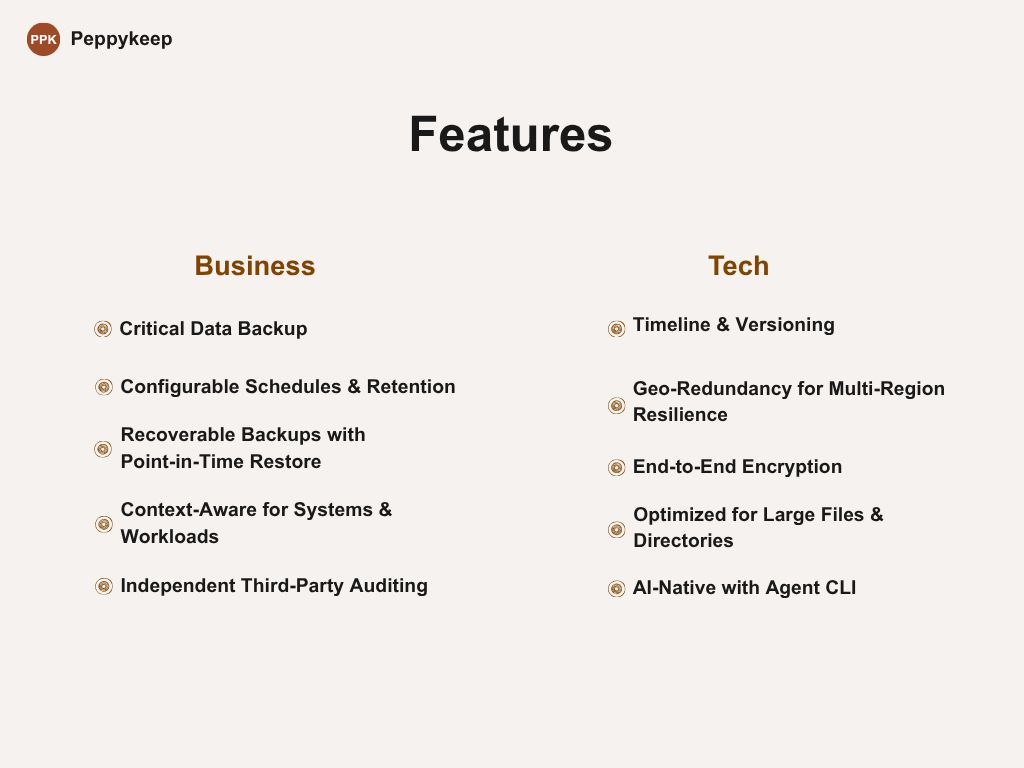
- Core backup: Backup for data directories, work assets, and MySQL databases.
- Scheduled backups and verified restores: Plan recurring backup jobs and restore data when files are lost or services fail.
- Recovery drills: Download, decrypt when applicable, and restore real backup points to validate end-to-end recovery.
- Retention and governance: Configure copy counts, retention periods, and policy-based cleanup to match reliability requirements.
- Application-aware backup: Protect application data, configuration files, business files, and databases as part of one recovery workflow.
- Timeline-based versioning: Maintain identifiable restore points with configurable time and version rules.
- Early risk detection: Use pre-flight checks, inspections, and validation to identify silent backup failures.
- Off-site and geographically redundant copies: Store local backups in S3-compatible object storage or other selected destinations, including destinations in separate locations, and verify availability through remote download.
- Encrypted backup: Support encrypted backups with user-generated, user-controlled key pairs.
- Large files and directories: Support chunking, encryption, and transfer for large files and directory trees.
3.Use cases
- Core data protection for individuals, teams, and enterprises.
- Backup for core enterprise applications and business systems, including databases and related business data.
- Backup and synchronization for work assets, including AI skills, AI agent databases, and configuration files.
- Encrypted MySQL database backup and recovery.
- Unified backup of application directories, configuration files, databases, and business files with timeline-based restore points.
- Recovery after accidental deletion of files, directories, or historical configurations.
- Periodic testing of real backup points to validate end-to-end recovery.
- Flexible multi-copy configurations and retention policies that improve resilience without unnecessary storage use.
- Backup, encryption, and transfer for large files and directory trees.
- Independent backup, synchronization, and recovery drills using third-party storage, without relying on fragmented in-application backup tools.
4.Platforms and documentation
PeppyKeep runs on Windows, macOS, and Linux. Installation and quick-start guides are available in the public Docs at User Manual. Additional product information is available on the PeppyKeep website and blog.
5.Plans and capability tiers
- Starter: Core file and directory backup, versioning, local and remote retention, S3-compatible remote backup, and general MySQL backup capabilities.
- Advanced: Encrypted backup, recovery drills, large-directory backup and restore, policy-based retention and cleanup, and audit-friendly operation trails.
- Universal: Broader support for business systems built on MySQL and similar technologies, with Advanced capabilities included.
- Dedicated: Application-aware backup designed for specific business systems, including user-selected multi-directory and multi-file work-asset backup, with Advanced capabilities included.
Capability availability may vary by product plan and release. See the PeppyKeep website and handbook for current details.